
You plug in your phone just like you always do. But lately, it’s begging for a charger by 3 PM instead of making it to bedtime. Don’t worry, your phone isn’t glitching out, it’s just basic chemistry.
Sure, all batteries get old. But how quickly yours ages comes down to everyday habits you probably don’t even realize you’re doing. Let’s look at what’s really going on inside your device, the common mistakes wearing it down, and a few simple tweaks that can easily add months or even years to its lifespan.
Why Is Your Phone Battery Down So Much Faster Than Before?
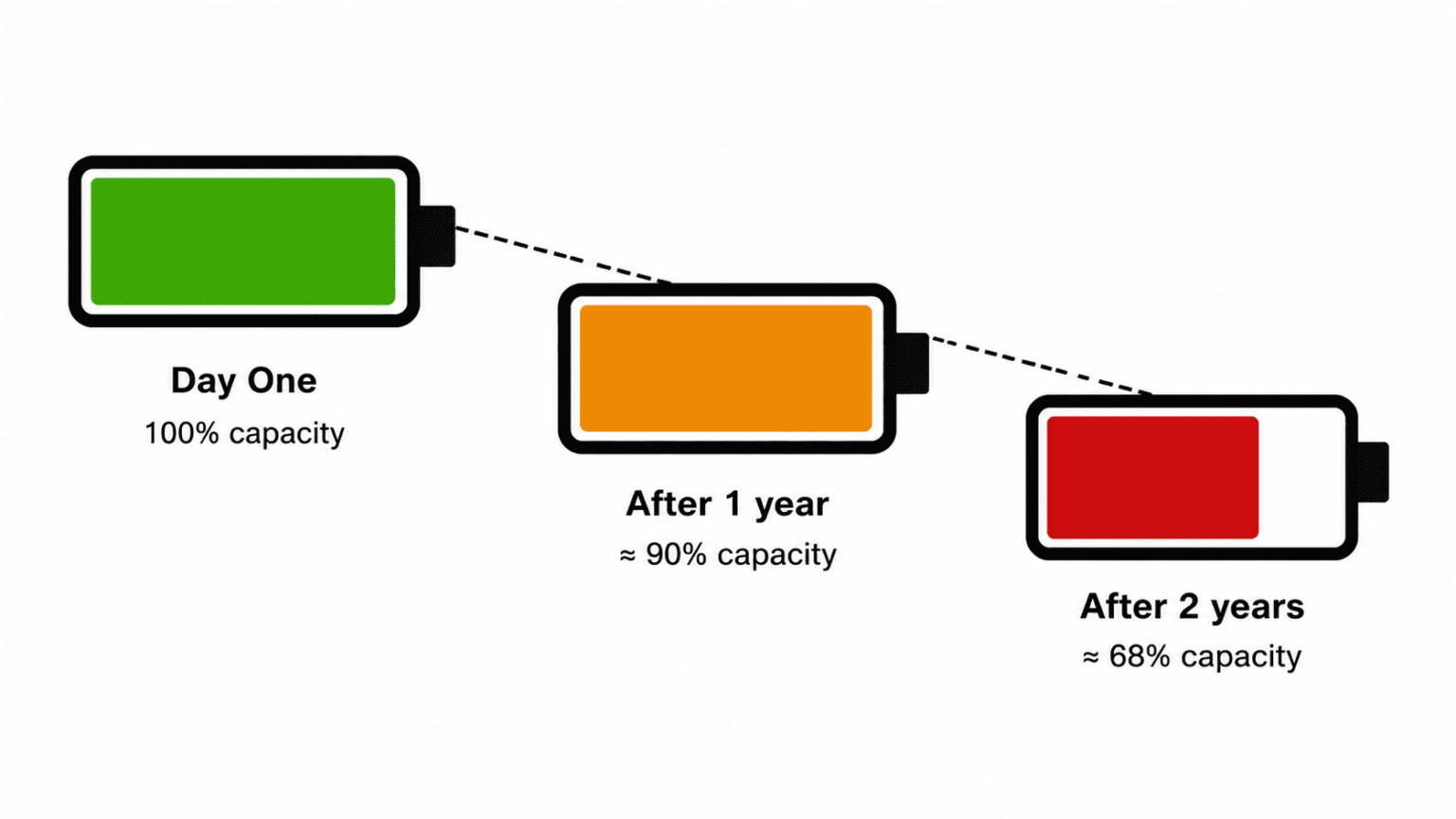
Every single time you charge up, your battery undergoes a tiny, permanent chemical shift. Fast forward a few hundred charge cycles, and it just can’t hold the same amount of juice it did out of the box.
Throw in some heat, letting it die completely, or relying on fast charging too much, and you speed up that decline in a big way. That’s why two phones bought on the exact same day can have wildly different battery health. It all comes down to how they’re treated.
In the tech world, we call this “capacity fade.” It’s the reason a heavily used two year old phone might actually have a worse battery than a four year old phone sitting in a drawer.
What’s Actually Happening Inside a Battery
It’s Chemistry, Not a Countdown Clock
Modern smartphones run on lithium ion batteries. Think of them as a tiny transit system, shuttling lithium ions back and forth between two electrodes whenever you use or charge the device. But here’s the catch: the trip is never 100% efficient. A tiny fraction of that usable lithium gets permanently stuck in side reactions along the way. While the loss from a single charge is incredibly small, it snowballs quickly over hundreds of cycles.
Cycles Matter More Than the Calendar
A full charge cycle is a complete 0 to 100% fill-up. But you don’t have to do it all at once for it to count. If you charge from 50% to 100% today, and do the exact same thing tomorrow, that equals roughly one cycle. That’s exactly why power users watch their battery health tank much faster than casual scrollers, regardless of how old the phone actually is.
Heat Does More Damage Than Use
If there’s one true enemy of battery life, it’s heat. High temperatures force those internal chemical reactions into overdrive, destroying capacity way faster than normal, everyday charging ever could. Leaving your phone baking on the dashboard of a hot car, or playing graphics heavy games for hours while plugged in, puts the battery under massive stress compared to sending a few texts.
The Habits Quietly Killing Your Battery
You usually don’t ruin a battery in one dramatic accident. Instead, it’s a slow drain caused by tiny, repetitive daily habits.
| Habit | Effect on Battery Health |
| Charging to 100% and leaving it plugged in | Prolongs high voltage stress |
| Routinely draining to 0% | Deep discharges wear the battery more than partial charges |
| Fast charging every time | More heat, faster chemical degradation |
| Gaming or streaming while charging | Combines charging heat with processor heat |
| Leaving the phone in sun or a hot car | The single fastest way to lose capacity |
| Using uncertified, off-brand chargers | Inconsistent voltage adds unnecessary strain |
Doing any of these things once in a blue moon won’t hurt. But make them a daily habit? You’re looking at the difference between a phone that lasts a solid three years and one that needs a lifeline by month 18.
How to Tell If Your Battery Health Has Actually Declined
Not sure if your battery is actually struggling or if you’re just using it more? Watch out for these red flags:
- The battery percentage randomly plummets (like dropping straight from 25% to 8%).
- Your phone feels uncomfortably warm, even when you’re just doing light, everyday tasks.
- It suddenly shuts off, even though the battery icon says you have plenty of juice left.
- Sitting on the charger takes noticeably longer than it used to.
- Overall performance takes a nosedive, especially when battery saver mode kicks in.
- The back panel looks a bit swollen or lifted if you see this, stop using the phone immediately.
You don’t have to guess, though. You can check the hard numbers right in your settings:
- iPhone: Settings → Battery → Battery Health & Charging
- Android: Settings → Battery → Battery Health (the exact wording depends on your phone brand)
Once that maximum capacity dips below 80%, that’s usually when you’ll really start feeling the burn during daily use.
Five Habits That Actually Slow Battery Aging
- Keep it between 20% and 80% when you can. Avoiding those extreme highs and lows takes a lot of voltage stress off the battery cells. If your phone has a “charge limit” or “optimized charging” feature built in, definitely turn it on.
- Try to skip the overnight charge. Leaving your phone pegged at 100% for six or eight hours straight adds unnecessary strain. Optimized charging tools are great for this because they delay the final top-off until right before your alarm goes off.
- Let your phone breathe. Take off thick cases if you’re fast charging or deep into a long gaming session. And whatever you do, keep it out of direct sunlight and parked cars.
- Use fast charging as a backup, not the default. Slower, standard charging generates way less heat. Try to save those super fast chargers for when you actually need a quick boost on the go.
- Keep your software updated. Phone makers are constantly tweaking power management in system updates. Staying up to date helps squash unnecessary background battery drain, which indirectly saves you from burning through extra charge cycles.
Mistakes People Make Trying to “Protect” Their Battery
- Waiting for it to hit 0% before plugging in. That old advice was meant for vintage nickel based batteries. Today’s lithium ion batteries actually prefer partial top ups over deep, zero percent drains.
- Force closing every app. This one totally backfires. When you force close an app, your phone has to use extra energy to reload it entirely from scratch the next time you open it. Letting them sleep paused in the background is far more efficient.
- Assuming any fast charger works the same. Cheap, off brand chargers push inconsistent power. That creates unnecessary strain and heat compared to a certified brick.
- Ignoring battery health until it’s an emergency. Don’t wait until your phone dies by noon to check its status. Keeping an eye on it gives you time to plan a battery swap on your own terms.
When Replacing the Battery Makes More Sense Than Replacing the Phone
If your battery health has dropped below 80% or if you just can’t reliably make it through a workday anymore don’t rush out to buy a brand new phone. A simple battery swap is wildly cheaper and becoming much more practical.
Over in the EU, new regulations kicking in by 2027 will actually force smartphone makers to design devices with batteries that users can replace at home with basic tools. It’s a massive push to cut down on ewaste and keep phones alive longer. But even if you don’t live in a region with these rules, most official manufacturers and independent repair shops will gladly swap in a fresh battery for a fraction of what a new device would cost.
At the end of the day, a phone battery draining faster than it used to isn’t defective. It’s just the predictable result of hundreds of charge cycles, random heat exposure, and daily routines most people never question.
You can’t reverse the chemistry, but you can absolutely slow it down with a few consistent changes keep your phone out of extreme charge ranges, let it stay cool, and use fast charging selectively. Take a second to check your battery health today. If it’s already sitting below 80%, treating it to a replacement is almost always the smarter, cheaper play before you even consider upgrading the whole phone.