

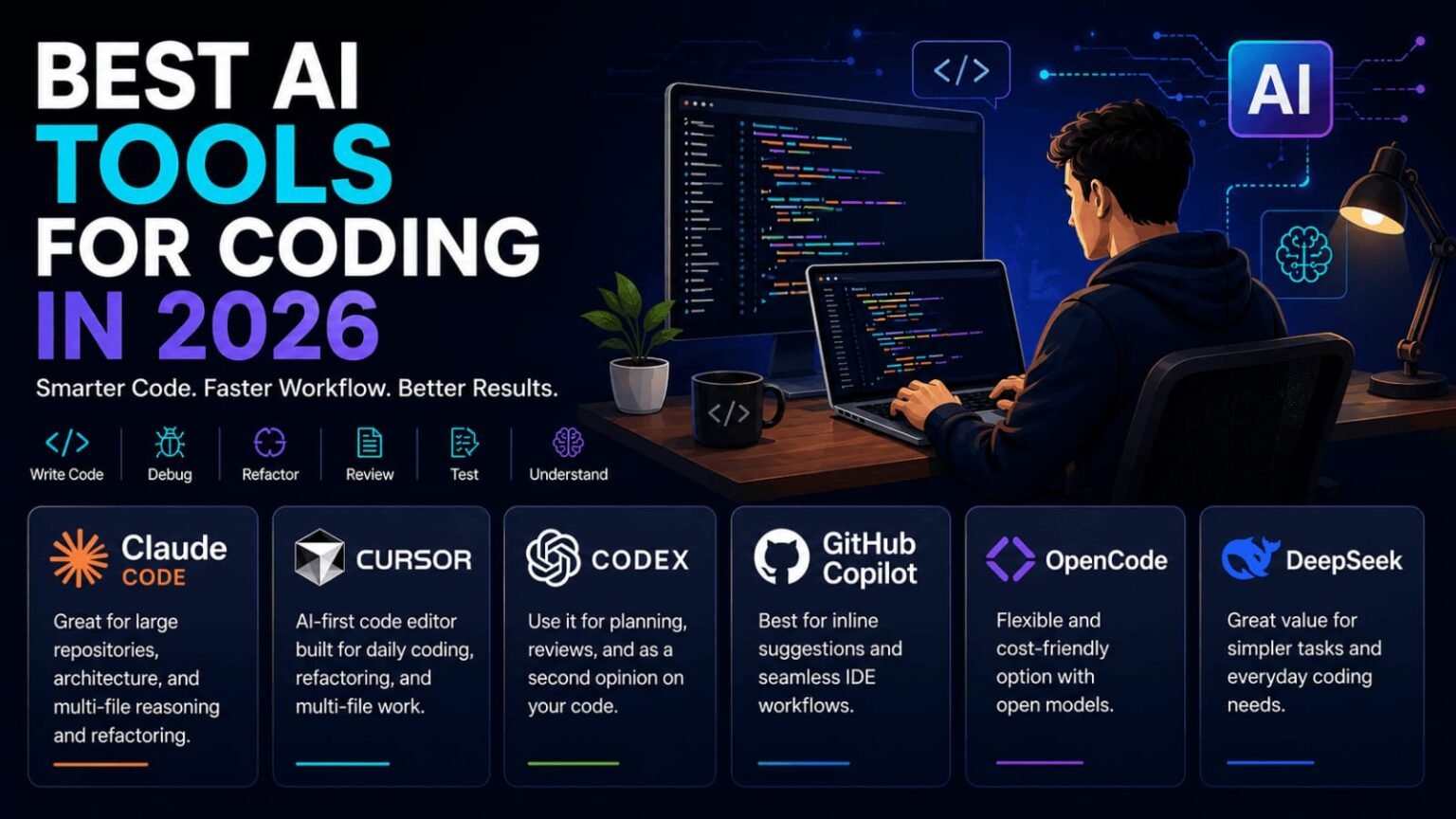
AI coding assistants are now practically essential for modern software development. But rather than relying on a single, one-size-fits-all solution, today’s developers are building toolkits tailored for specific tasks—like planning, debugging, refactoring, and reviewing.
In 2026, the best AI coding tools aren’t just the ones packed with the most features. Finding the perfect fit really comes down to your personal coding style, the scale of your projects, your budget, and exactly how much control you want to keep over the generated code.
What Makes a Good AI Coding Tool?
Before you commit to an AI assistant, take a moment to figure out what you actually need from it.
A truly helpful coding companion should make your life easier by:
- Writing and completing code
- Understanding existing projects
- Debugging errors
- Refactoring code
- Working across multiple files
- Creating tests
- Explaining unfamiliar code
- Planning new features
- Reviewing code changes
- Working smoothly with your development environment
If you’re just hacking together a simple side project, a snappy autocomplete feature might be plenty. However, if you’re tackling large-scale applications, you’ll likely need an AI that grasps the complex relationships between multiple files and components.
- Claude Code — Best for Complex Coding Tasks
Claude Code stands out as a powerhouse for developers wrestling with massive repositories and intricate tasks.
It really shines when a change requires a deep understanding of how different parts of your project interact.
Where Claude Code can help
- Large repositories
- Multi-file development
- Refactoring
- Architecture decisions
- Codebase analysis
- Complex implementation tasks
- Understanding existing project structures
Picture yourself tweaking the authentication system of a massive web app. That single feature might touch database queries, backend logic, API endpoints, and frontend components.
Instead of painfully reviewing one file at a time, having an AI that can reason through the broader project structure makes this kind of heavy lifting so much more manageable.
Who should consider it?
Claude Code is a fantastic match for developers who live in complex codebases and need serious architectural support, not just basic code completion.
- Cursor — Best AI-First Coding Editor
Cursor is built from the ground up for AI-assisted programming, making it a massive hit with developers who want artificial intelligence baked right into their native environment.
No more context-switching between your browser and your editor—you can chat with your AI right where the work happens.
What makes Cursor useful?
Cursor steps up to the plate when you need help with:
- Writing new code
- Editing existing code
- Understanding project files
- Refactoring
- Multi-file changes
- Debugging
- Explaining code
Its biggest draw is undeniably that seamless, editor-based workflow.
You stay completely in the zone, working on your app while casually asking the AI to explain a weird function, tweak a specific block, or help scaffold a new feature.
Who should use Cursor?
Give Cursor a shot if you’re craving a true AI-first development environment rather than just bolting a plugin onto your current setup.
It’s perfect for those of us who spend our entire day living inside a code editor.
- Codex — Useful for Coding and Review
Codex is a fantastic piece of a broader AI-assisted workflow.
Instead of leaning on it purely to spit out code, you can use it as a sounding board to brainstorm implementation strategies, review your recent changes, and spot trouble before it ships.
A practical Codex workflow
You could use AI to:
- Describe the feature you’re planning.
- Break the feature into smaller tasks.
- Review the proposed implementation.
- Generate or modify code.
- Look for potential bugs.
- Suggest test cases.
- Review the final changes.
This collaborative approach usually yields much better results than lazily demanding the AI to “build everything.”
Ultimately, you’re still the developer in the driver’s seat—you make the architecture calls and verify that the final product actually works.
- GitHub Copilot — Best for Everyday Coding
GitHub Copilot is the go-to for developers who want a reliable, invisible assistant right inside their favorite development environments.
Its claim to fame is its incredibly intuitive code completion.
Start typing a Python function, add a quick comment about what it should do, and Copilot will often instantly suggest the rest. You just decide whether to accept, tweak, or reject it.
Good use cases
GitHub Copilot is particularly great for:
- Code completion
- Boilerplate
- Repetitive programming tasks
- Simple functions
- Documentation
- Familiar IDE workflows
- Learning programming concepts
If you just want lightning-fast assistance without needing the AI to analyze your entire repository architecture, an autocomplete-focused tool like Copilot is tough to beat.
- OpenCode — A Flexible Approach
OpenCode is an intriguing alternative for developers who crave flexible AI-assisted coding workflows.
The main draw here is the freedom to play around with different models and settings, rather than being locked into one company’s ecosystem.
When flexibility matters
This kind of modular setup is ideal if you want to:
- Experiment with different AI models
- Adjust your coding workflow
- Explore lower-cost options
- Customize how AI interacts with your projects
- Try open or alternative models
Keep in mind, though, that with great flexibility comes a bit more configuration.If you just want an easy plug-and-play experience, a more deeply integrated tool might be a better fit.
- DeepSeek — Worth Considering for Value
DeepSeek has emerged as a compelling option that developers shouldn’t overlook.
It’s especially attractive if you want to dive into AI-assisted coding without automatically subscribing to the most expensive tier on the market.
Potential use cases
You can put models like DeepSeek to work on tasks including:
- Generating code
- Explaining programming concepts
- Debugging
- Writing SQL queries
- Creating scripts
- Solving programming problems
- Suggesting implementation approaches
The real trick here is to test the results on your own day-to-day work. Don’t just assume the priciest model is inherently the best for every language or task.
Why One AI Tool May Not Be Enough
One of the most fascinating shifts in modern programming is that you don’t have to pledge loyalty to just one tool anymore.
Different assistants excel at different jobs.
For example:
Planning: Use an AI assistant to break down a complicated feature.
Implementation: Use your preferred coding editor or coding agent to make the changes.
Review: Use another AI assistant to act as a fresh set of eyes on the implementation.
Testing: Ask AI to suggest test cases, then run those tests yourself.
Documentation: Use AI to draft an initial explanation of the finished feature.
This creates a healthy ecosystem where AI acts as a supporting character at every stage of the lifecycle, rather than trying to replace the entire development process.
A Simple AI Coding Workflow for Beginners
If you’re a student or just starting out, don’t overwhelm yourself with a massive tech stack right away.
Start with a simple workflow.
Step 1: Understand the problem
Frame your issue clearly.
For example:
«”I need to create a Python program that reads student marks and calculates the average.”»
Before demanding the finished code, ask the AI to walk you through the logic and approach first.
Step 2: Build the basic version
Use your coding assistant to help draft the initial implementation.
Make sure you actually read the generated code instead of blindly copy-pasting it.
Step 3: Test it
Throw both normal and highly unexpected inputs at it.
For example:
- Empty input
- Negative values
- Very large values
- Incorrect data types
- Missing information
Step 4: Ask AI to review it
Once your code is running smoothly, feed it back to the AI and ask it to hunt for bugs, overcomplicated logic, or potential improvements.
Step 5: Make the final decision yourself
Never merge an AI suggestion on autopilot.
You need to understand exactly why a change is happening before adding it to your codebase.
AI Coding Tools Can Still Make Mistakes
Let’s be real—even the most advanced coding assistants hallucinate and make mistakes.
Generated code may:
- Contain bugs
- Use outdated approaches
- Introduce unnecessary dependencies
- Misunderstand project requirements
- Miss edge cases
- Create security problems
- Break existing functionality
This is exactly why human oversight is non-negotiable.
Before you commit any AI-generated change, run through this quick checklist:
- Does this code actually solve the problem?
- Do I understand what it does?
- Does it fit the existing project?
- Have I tested it?
- Could it introduce a security issue?
- Are there simpler ways to solve the problem?
The goal isn’t to let the AI do your job. The goal is to use AI strictly where it provides meaningful value.
How to Choose the Best AI Coding Tool for You
Finding the perfect AI coding tool in 2026 really comes down to your unique requirements.
For large codebases
Look for tools that specialize in repository-wide context, multi-file changes, and complex reasoning.
For everyday coding
An AI-first editor or a solid autocomplete engine will give you the most frictionless experience.
For code review
Try bringing in a secondary AI assistant to provide a fresh perspective on important changes.
For students
Prioritize tools that explain how the code works, rather than ones that just hand you the finished project.
For budget-conscious developers
Shop around for platforms that deliver exactly what you need without upcharging for enterprise capabilities you won’t use.
Don’t Choose a Tool Based Only on Popularity
The AI landscape shifts quickly. A tool that completely transformed another developer’s workflow might not be the best choice for yours.