

Understanding Variables and Data Types: A Python for Beginner Guide–>
When you start writing Python programs, you quickly need to do more than store values in variables. You need to calculate numbers, compare values, check multiple conditions, and make decisions.
That is where operators come in.
In this lesson, you’ll learn the most important Python operators and see how they work together with input(), print(), type casting, and conditional statements.
Table of Contents
What Are Python Operators?
An operator is a symbol or keyword that tells Python to perform an operation on one or more values.
For example:
10 + 5
Here:
- 10 and 5 are values.
- + is the operator.
- The result is 15.
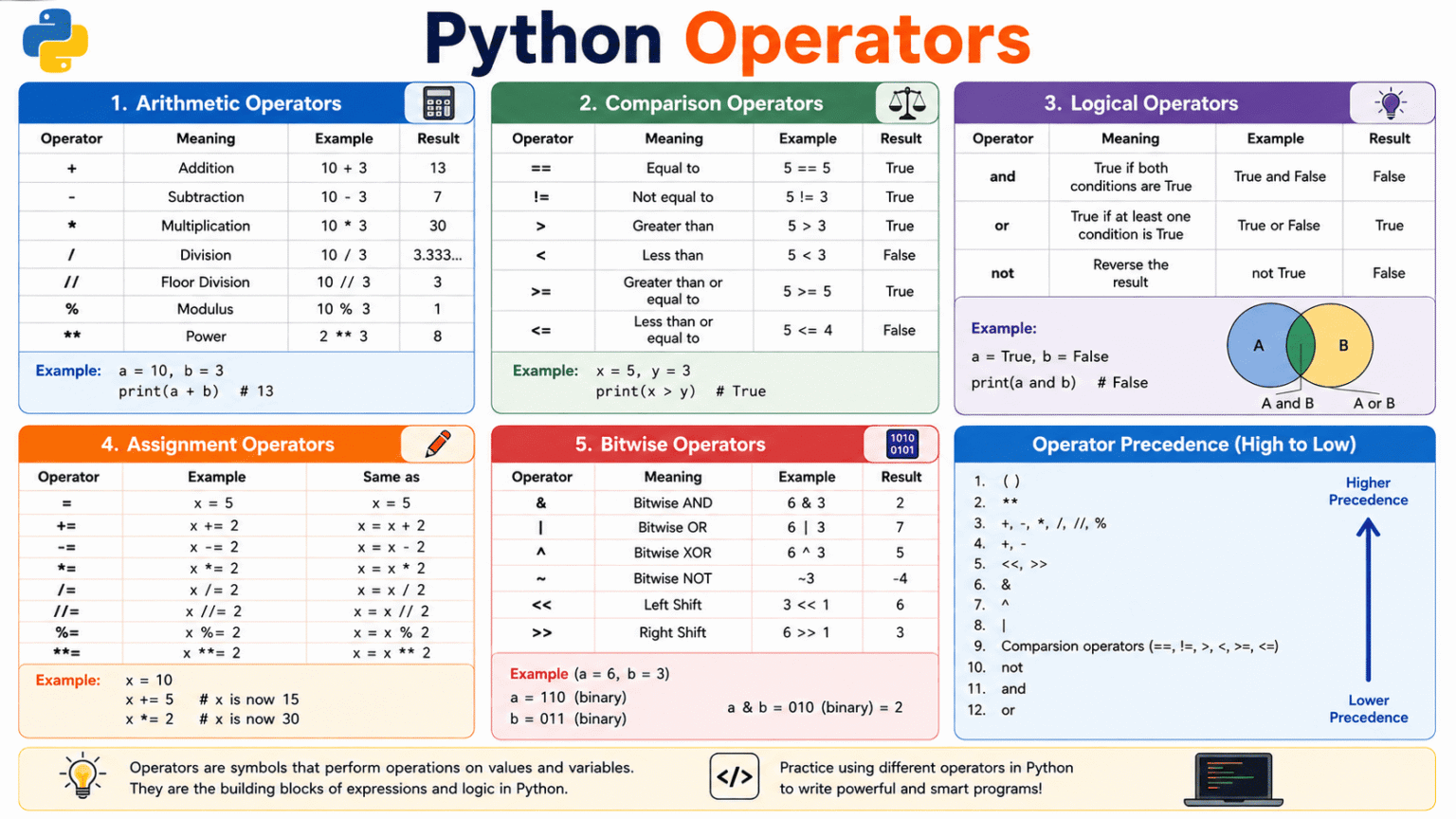
Python has several types of operators. The main ones beginners should understand are:
- Arithmetic
- Comparison
- Logical
- Assignment
- Bitwise
Let’s look at each one.
1. Arithmetic Operators
Arithmetic operators are used for mathematical calculations.
| Operator | Purpose | Example | Result |
| + | Addition | 10 + 3 | 13 |
| – | Subtraction | 10 – 3 | 7 |
| * | Multiplication | 10 * 3 | 30 |
| / | Division | 10 / 3 | 3.333… |
| // | Floor division | 10 // 3 | 3 |
| % | Remainder | 10 % 3 | 1 |
| ** | Power | 2 ** 3 | 8 |
Example
a = 10

b = 3

print(a + b)

print(a - b)

print(a * b)

print(a / b)

print(a // b)

print(a % b)

print(a ** b)
Output:
13
7
30
3.3333333333333335
3
1
1000
Using % to Check Even and Odd Numbers
The % operator returns the remainder after division.
For example:
print(10 % 2)
Output:
0
Because the remainder is 0, we know that 10 is even.
print(7 % 2)
Output:
1
So 7 is odd.
This simple operator becomes very useful when building real programs.
2. Comparison Operators
Comparison operators are used to compare two values.
The result is always either:
True
or:
False
These are Boolean values.
| Operator | Meaning |
| == | Equal to |
| != | Not equal to |
| > | Greater than |
| < | Less than |
| >= | Greater than or equal to |
| <= | Less than or equal to |
Example
age = 20

print(age == 20)

print(age > 18)

print(age < 18)

print(age != 25)
Output:
True
True
False
True
= vs ==
This is one of the most common mistakes beginners make.
age = 20
Here, = assigns 20 to age.
But:
age == 20
asks Python:
Is age equal to 20?
For example:
age = 20
print(age == 20)
Output:
True
Remember:
= → assign a value
== → compare two values
3. Logical Operators
Logical operators allow you to combine multiple conditions.
Python has three main logical operators:
and
or
not
and
and returns True only when both conditions are true.
age = 20
has_id = True
print(age >= 18 and has_id)
Output:
True
Both conditions are true, so the final result is True.
or
or returns True when at least one condition is true.
has_email = True
has_phone = False
print(has_email or has_phone)
Output:
True
The first condition is already true, so the complete expression is true.
not
not reverses a Boolean value.
is_raining = False
print(not is_raining)
Output:
True
Because is_raining is False, not changes it to True.
Logical operators are especially useful when creating conditions such as:
- Login validation
- Student eligibility
- Age verification
- Form validation
4. Assignment Operators
Assignment operators are used to store or update values.
The most basic assignment operator is:
=
Example:
score = 50
Here, 50 is assigned to the variable score.
Python also provides shortcut assignment operators.
| Operator | Example | Same as |
| = | x = 5 | x = 5 |
| += | x += 2 | x = x + 2 |
| -= | x -= 2 | x = x – 2 |
| *= | x *= 2 | x = x * 2 |
| /= | x /= 2 | x = x / 2 |
| //= | x //= 2 | x = x // 2 |
| %= | x %= 2 | x = x % 2 |
| **= | x **= 2 | x = x ** 2 |
Example
score = 10

score += 5

print(score)

score *= 2

print(score)
Output:
15
30
Instead of writing:
score = score + 5
you can write:
score += 5
This makes repeated value updates easier to read.
5. Bitwise Operators
Bitwise operators work directly with the binary representation of integers.
Computers represent numbers using bits, which have values of 0 or 1.
Python provides these bitwise operators:
| Operator | Meaning |
| & | Bitwise AND |
| ^ | Bitwise XOR |
| ~ | Bitwise NOT |
| << | Left shift |
| >> | Right shift |
You don’t need to use these operators in most beginner programs, but understanding the basics is useful.
Example
a = 6

b = 3

print(a & b)

print(a | b)

print(a ^ b)
Output:
2
7
5
Why does 6 & 3 produce 2?
The numbers can be written in binary:
6 = 110
3 = 011
The & operator compares each bit:
110
011
—
010
010 in binary is 2.
Therefore:
6 & 3
produces:
2
Bitwise operators are commonly used in areas such as networking, permissions, embedded systems, and low-level programming.
6. Getting User Input with input()
So far, our programs have used values that were already written in the code.
Real programs often need information from the user.
Python provides the input() function for this.
Example
name = input("Enter your name: ")

print(name)

If the user enters:

Alex

the program prints:

Alex

You can also use the value in a sentence:

name = input("Enter your name: ")

print(f"Hello, {name}!")
Output:
Hello, Alex!
7. An Important Rule About input()
There is one thing every beginner should remember:
input() always returns a string.
For example:
age = input("Enter your age: ")

print(type(age))

If the user enters:

20
Python still treats it as text.
Output:
<class ‘str’>
That means this can cause an error:
age = input(“Enter your age: “)
print(age + 1)
Python cannot directly add the integer 1 to a string.
We need type casting.
8. Python Type Casting
Type casting means converting a value from one data type to another.
The most common conversion functions are:
int()
float()
str()
bool()
int()
Converts a value to an integer.
age = int(input(“Enter your age: “))
print(age + 1)
If the user enters:
20
the output is:
21
float()
Converts a value to a floating-point number.
price = float(input(“Enter the price: “))
print(price)
For example, entering:
99.50
produces:
99.5
str()
Converts a value to a string.
number = 100
text = str(number)
print(“Number: ” + text)
Output:
Number: 100
bool()
Converts a value to True or False.
print(bool(1))
print(bool(0))
Output:
True
False
An empty string is also considered false:
print(bool(“”))
print(bool(“Python”))
Output:
False
True
9. Displaying Output with print()
The print() function displays information on the screen.
You can print a single value:
name = “Alex”
print(name)
You can also print several values:
name = “Alex”
age = 21
print(“Name:”, name)
print(“Age:”, age)
Python also provides f-strings, which are an easy way to create formatted text.
name = “Alex”
age = 21
print(f”My name is {name} and I am {age} years old.”)
Output:
My name is Alex and I am 21 years old.
The values inside {} are replaced with the corresponding variables.
10. Conditional Statements
Operators become much more powerful when combined with conditional statements.
A conditional statement allows a program to make a decision based on a condition.
Python provides:
if
elif
else
if
The if block runs when its condition is true.
age = 20

if age >= 18:

    print("You can vote.")
Since 20 >= 18 is true, the message is displayed.
else
else runs when the if condition is false.
age = 16

if age >= 18:

    print("You can vote.")

else:

    print("You cannot vote.")
Output:
You cannot vote.
elif
elif means else if.
It lets you check another condition when the previous one was false.
marks = 75

if marks >= 90:

    print("Grade A+")

elif marks >= 75:

    print("Grade A")

elif marks >= 60:

    print("Grade B")

else:

    print("Grade C")
Output:
Grade A
Python checks the conditions from top to bottom and executes the first matching block.
11. Nested Conditions
A nested condition is a conditional statement placed inside another conditional statement.
For example:
age = 20

has_id = True

if age >= 18:

    if has_id:

        print("Entry allowed.")

    else:

        print("Please show your ID.")

else:

    print("You are under 18.")
Here, Python first checks the person’s age.
Only when the person is at least 18 does it check whether they have an ID.
In many situations, nested conditions can be simplified with a logical operator:
age = 20
has_id = True
if age >= 18 and has_id:
print(“Entry allowed.”)
else:
print(“Entry not allowed.”)
For simple conditions, this version is often easier to read.
12. Putting Everything Together
Now let’s build a small program that combines:
- input()
- Type casting
- print()
- Comparison operators
- Logical operators
- Conditional statements
- Formatted output
Student Eligibility Checker
name = input("Enter your name: ")

age = int(input("Enter your age: "))

marks = float(input("Enter your marks: "))

print()

print(f"Hello, {name}!")

print(f"Age: {age}")

print(f"Marks: {marks}")

if age >= 18 and marks >= 50:

    print("Status: Eligible")

elif age >= 18:

    print("Status: Not eligible because marks are below 50.")

else:

    print("Status: Not eligible because you are under 18.")
output:
Enter your name: Alex
Enter your age: 20
Enter your marks: 78
Hello, Alex!
Age: 20
Marks: 78.0
Status: Eligible
Notice how several concepts work together.
The program gets data using input(), converts the numeric values using int() and float(), displays the information using print(), and uses comparison and logical operators to make a decision.
This is how individual Python concepts start becoming real programs.
Practice Problems
Now test your understanding.
1. Even or Odd
Ask the user to enter a number and determine whether it is even or odd.
Hint: Use %.
2. Largest Number
Ask the user for two numbers and print the larger number.
3. Login Validation
Create a program that asks for a username and password.
The login should succeed only when both values are correct.
4. Student Eligibility
Ask the user for their age and marks.
A student is eligible when:
Age >= 18
Marks >= 60
5. Simple Calculator
Ask the user for:
- First number
- Second number
- Operator
Then perform the selected operation.
For example:
Enter first number: 10
Enter second number: 5
Enter operator: *
Result: 50
Quick Revision
By the end of this lesson, you should understand the purpose of these operators:
Arithmetic
+ – * / // % **
Comparison
== != > < >= <=
Logical
and or not
Assignment
= += -= *= /= //= %= **=
Bitwise
& | ^ ~ << >>
You should also understand how these concepts work together:
input()
↓
Type casting
↓
Operators
↓
Conditions
↓
print()
For example, a user enters a number, Python converts it into an integer, an operator performs a calculation or comparison, a condition makes a decision, and print() displays the result.
That combination is the foundation for many Python programs you’ll build later.
What’s Next?
After learning operators and conditions, a natural next step is Python loops. Loops allow you to repeat code efficiently using for and while.