

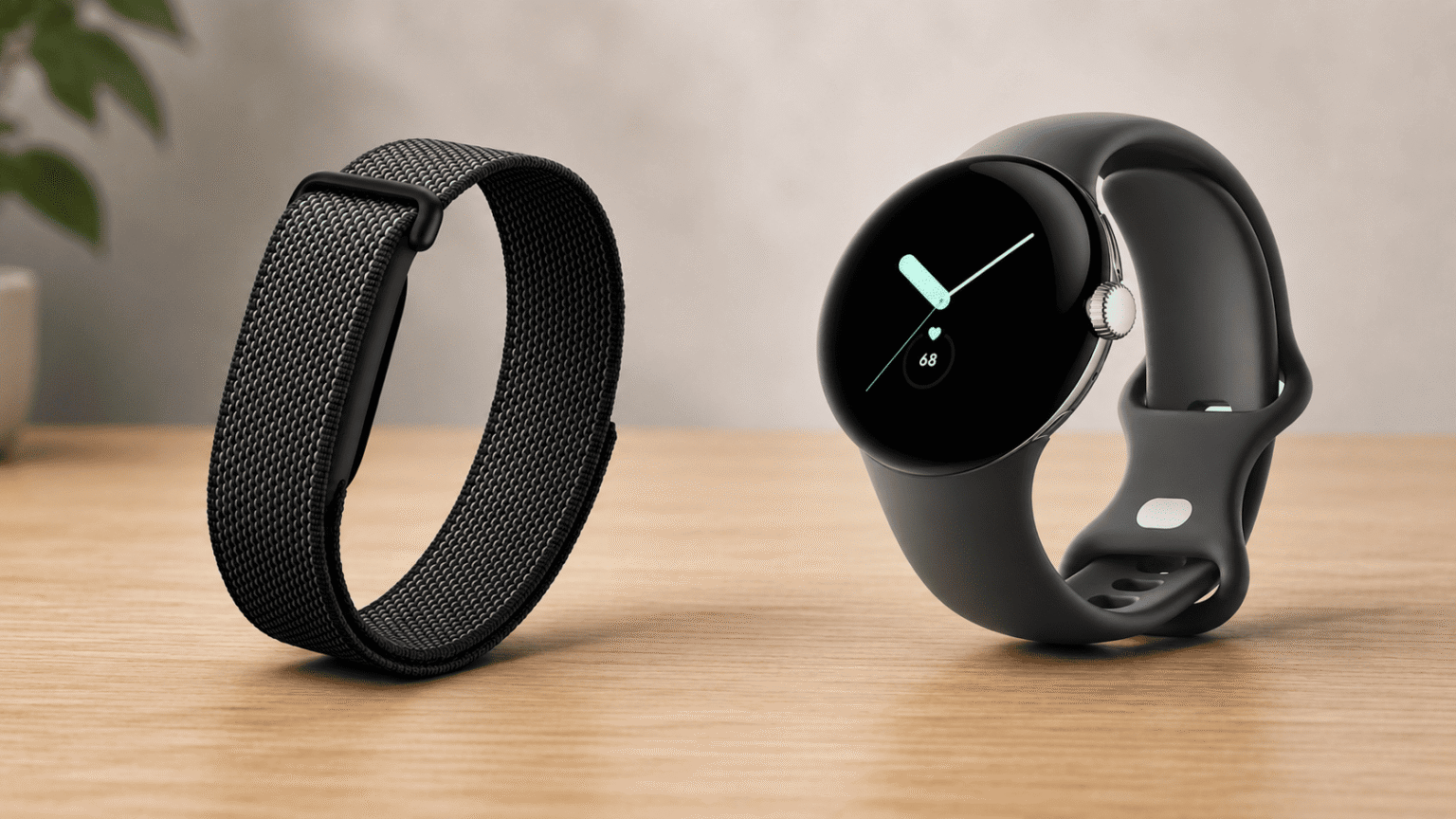
Shopping for a fitness tracker? You’ve probably realized Google is doing more than just smartwatches these days. Enter the Google Fitbit Air a new, screenless health tracker. It’s smaller, budget-friendly, and designed for anyone who wants health stats without a constant wrist buzz. But “screenless tracker” is a bit vague. It’s also easy to mix up with a Google Watch (the Pixel Watch lineup), even though they serve completely different purposes. Let’s clear up the confusion. We’ll look at what the Google Fitbit Air actually does, how much it costs, how it stacks up against a Google Watch, and a few common pitfalls to avoid before buying. By the end, you should have a solid idea of which device makes sense for you.
What Is the Google Fitbit Air?
Think of the Google Fitbit Air as a minimalist, band style health tracker. It quietly monitors your heart rate, sleep, and daily activity 24/7, syncing everything to the Google Health app. It even packs an optional Gemini powered AI coaching feature.
The biggest difference from a traditional Fitbit or Pixel Watch? Zero display. You can’t check your texts or even glance at the time. Its only job is to gather data in the background and send it to your phone. Google treats it like a modern take on the original Fitbit pedometer small, low key, and designed to blend right into your day.
It hit the market in 2026 when the Fitbit app rebranded to Google Health, bringing all of Google’s wellness tracking and the new Google Health Coach under one roof.
Key Features and Specs
| Price | $99.99 (includes a 3-month Google Health Premium trial) |
| Design | Screenless “pebble” tracker, roughly 12g |
| Compatibility | Android 11.0+ or iOS 16.4+, requires a Google Account and the Google Health app |
| Battery life | Up to 7 days ,5 minutes of charging ≈ 1 day of power |
| Water resistance | Up to 50 meters |
| Materials | Recycled polycarbonate and PBT housing, textile band with a stainless steel buckle |
| Sensors | Heart rate, SpO2, heart rate variability, breathing rate, skin temperature, heart rhythm/AFib detection |
| AI features | Google Health Coach, built with Gemini (requires Premium for full functionality) |
Health and Fitness Tracking
The Fitbit Air handles all the standard metrics automatically, logging your steps, distance, calories, and active zone minutes without any input on your end. But it also dives deeper. You get Cardio Load and Readiness scores that tell you if you should push hard at the gym or take a rest day. It also keeps an eye on your heart rhythm, watching for potential signs of atrial fibrillation while you sleep or relax. another nice touch is Smart Wake. Instead of a jarring alarm, it tracks your sleep stages and heart rate to wake you with a soft vibration during light sleep.
Battery Life and Charging
Battery life is a massive advantage over the Google Watch. Because there is no screen draining the battery, the Fitbit Air lasts up to a week per charge. And if you forget to plug it in overnight? Just five minutes on the charger gives you roughly a full day of power.
Design and Comfort
Weighing in at just 12g with a slim 17mm band, it’s easy to forget you even have it on. This is especially great for sleep tracking, an area where bulky smartwatches usually feel uncomfortable. The Air sits comfortably below your wrist bone, feeling more like a bracelet than a piece of tech. You can also swap out the bands like the micro-adjustable Performance Loop to match your style.
Since both trackers are made by Google and use similar apps, shoppers easily get them mixed up. Here is the bottom line: a Google Watch (like the Pixel Watch) is a complete smartwatch featuring a screen, apps, and text notifications. The Fitbit Air is just a screenless band focused entirely on background health tracking.
| Google Fitbit Air | Google Watch (Pixel Watch) | |
| Screen | None | Full color touchscreen |
| Notifications | No | Yes |
| Apps and Wear OS | No | Yes |
| Battery life | Up to 7 days | Roughly 1–2 days |
| Price | $99.99 | Starts significantly higher |
| Best for | Passive tracking, sleep, minimal distraction | Notifications, apps, calls, GPS navigation |
If you need to read texts, follow Google Maps, or take calls on the go, grab a Google Watch. But if you just want solid health data without the urge to check a screen all day, the Fitbit Air hits the sweet spot. It feels much closer to a Whoop band or an Oura Ring than a standard smartwatch.
A Google Watch is a smartwatch with a screen and apps, the Google Fitbit Air is a screenless tracker focused only on 24/7 health monitoring.
Setting Up Your Google Fitbit Air
- Charge it first : Snap the tracker onto its charging cable before doing anything else.
- Download the Google Health app: and log into your Google Account.
- Pair the device: by following the prompts on your screen.
- Position it correctly :Place it on top of your wrist, just behind the wrist bone. Keep it snug enough that you can only slide a pinky finger underneath.
- Let it sync automatically: as you move through your day.
Common Mistakes to Avoid
- Wearing it too loose: The sensors need constant skin contact to read your heart rate accurately. A loose band guarantees bad data, especially when working out.
- Assuming it replaces a smartwatch: If you want on-the-go notifications or live GPS mapping for your runs, this isn’t the right device.
- Skipping the Premium trial evaluation: Many people forget to figure out if they actually need the Premium features before the free trial ends and they get billed.
- Not drying the band after sweat or showers: Google suggests drying it off to keep your skin happy and make the band last longer.
- Buying based on price alone: Yes, $99.99 is cheap for a tracker, but you should still weigh sensor accuracy and battery life against rivals like the Amazfit Helio Strap before deciding.
Who Should Actually Buy the Google Fitbit Air?
- Want 24/7 health tracking without staring at another screen
- Care about sleep tracking and hate wearing bulky watches to bed
- Want a budget friendly way to get into wearable health tech
- Already use an Android or iPhone tied to a Google Account
- Want to text back or use apps from your wrist
- Rely on on-device GPS mapping for outdoor runs
- Want a traditional watch face to check the time
The Google Fitbit Air nails its target audience: people who want comfortable, long lasting health tracking without the constant ping of a smartwatch. It obviously won’t replace a Google Watch if you need apps, but for sleep data, background tracking, and a battery that lasts all week, it’s one of the most practical things Google has made in a while. Think about how much you actually want your wrist buzzing during the day. That answer will tell you which one to buy.