

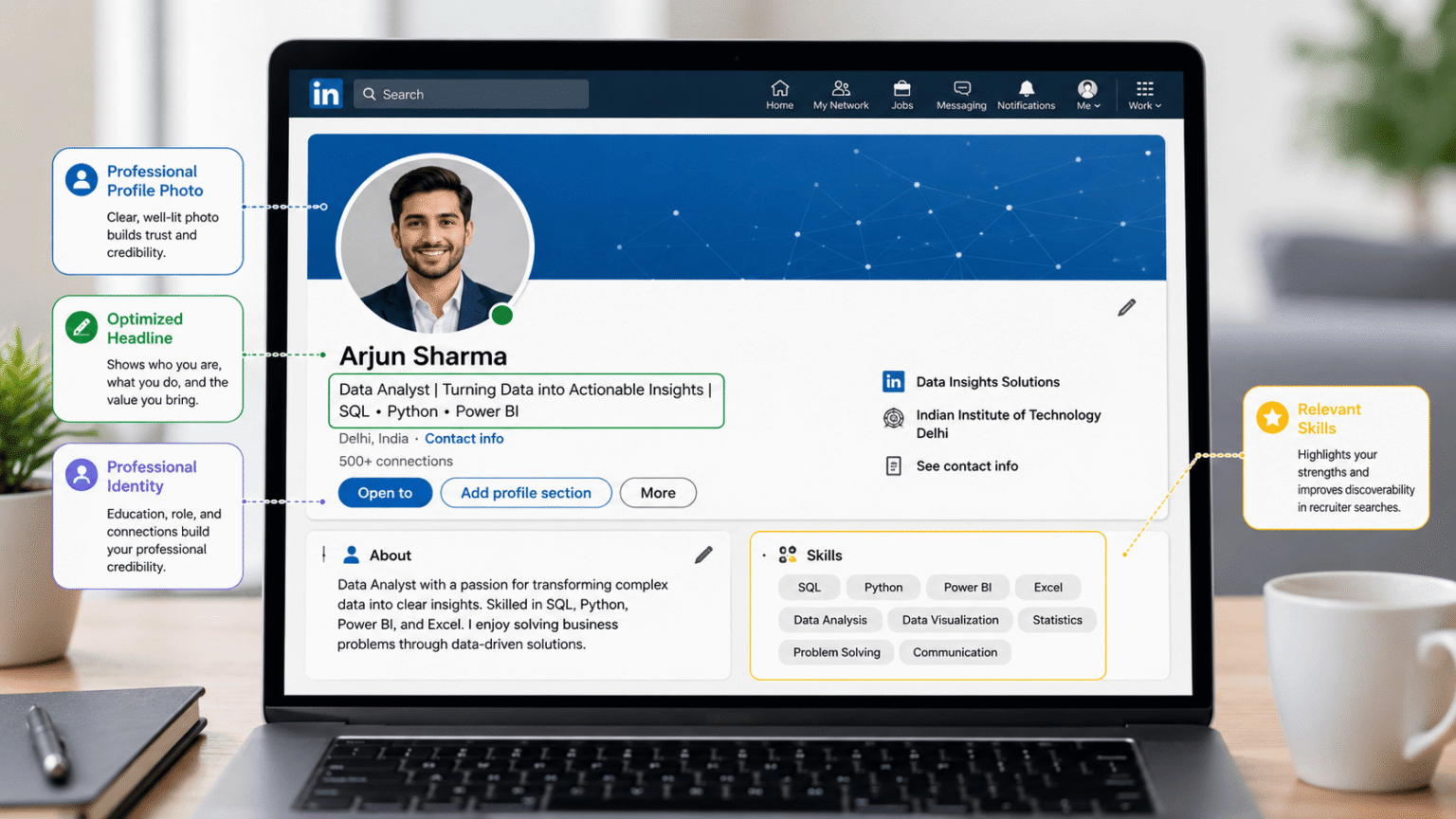
Think of your LinkedIn profile as your digital handshake. Long before you sit down for an interview or send an email, recruiters and hiring managers are likely looking you up. It doesn’t matter if you’re a college student hunting for an internship, a recent grad trying to land your first full-time role, or an industry veteran looking to level up—your profile sets the tone.
Calling it just an “online resume” misses the bigger picture. When optimized correctly, LinkedIn profile optimization helps turn LinkedIn into your personal brand, a networking hub, and a portfolio that works around the clock.
The problem is that a lot of people treat it like a set-it-and-forget-it platform. They add a photo, plug in their current job, and then abandon the account. By doing that, they’re practically hiding from recruiter searches and leaving valuable networking opportunities on the table.
This guide walks you through the essentials of LinkedIn profile optimization. We’ll cover actionable tips, the pitfalls to avoid, and the current best practices to make sure your professional LinkedIn profile actually stands out in 2026. If you’re serious about LinkedIn profile optimization, these steps give you a practical place to start.
By the end of this read, you’ll know exactly how to improve every single section of your page and start getting more visibility right away.
Why LinkedIn Profile Optimization Matters
With millions of active users, LinkedIn has evolved into the internet’s biggest professional networking platform. You can also review LinkedIn’s official profile guidance when checking the basics of your profile. People log on every day to:
- Find jobs
- Build industry connections
- Share expertise
- Discover learning opportunities
- Recruit employees
- Grow personal brands
Effective LinkedIn profile optimization helps you:
| Benefit | Why It Matters |
| Better search visibility | Recruiters can discover your profile more easily. |
| Stronger first impression | A polished profile builds trust. |
| More networking opportunities | Professionals are more likely to connect. |
| Higher interview chances | A complete profile showcases your qualifications. |
| Increased credibility | Recommendations and achievements strengthen your reputation. |
What Is LinkedIn Profile Optimization?
Simply put, LinkedIn profile optimization is about fine-tuning every single part of your page. The goal is to make sure it genuinely reflects your skills, experience, and where you want your career to go—all while making it incredibly easy for the right people to find you. Good LinkedIn profile optimization also means keeping the information accurate and relevant to the roles you want next.
Featured Snippet Answer
LinkedIn profile optimization means improving your profile headline, photo, summary, work experience, skills, education, and keywords so recruiters can easily discover your profile and understand your professional value.
Step 1: Choose a Professional Profile Photo
A professional photo is one of the simplest LinkedIn profile optimization improvements you can make.
Like it or not, your profile picture is the first thing people judge. It’s a proven fact that accounts with a solid, professional photo get significantly more views and connection requests than those with a blank avatar.
Best Practices
✔ High-quality image
✔ Good lighting
✔ Simple background
✔ Business casual or professional attire
✔ Friendly smile
Avoid:
- Selfies
- Group photos
- Heavy filters
- Blurry images
- Cropped social media pictures
Step 2: Write an Attention-Grabbing Headline
Your headline is another important part of LinkedIn profile optimization because it can communicate your professional direction at a glance.
Your headline follows you everywhere on LinkedIn—from comments to search results. Most people waste this space on their default job title. LinkedIn confirms that the professional headline appears in search results and can be used to highlight an area of expertise. LinkedIn’s headline guidance
Instead of writing a generic:
Student at ABC College
Try something more descriptive:
Computer Science Student | Python Developer | Data Analytics Enthusiast | Open to Internship Opportunities
A strong headline generally includes your:
- Current role
- Expertise
- Industry
- Key skills
- Career objective
Examples
Student
Computer Science Student | Python | SQL | Machine Learning Enthusiast
Software Developer
Software Engineer | Java | Cloud Computing | Backend Development
Marketing Professional
Digital Marketing Specialist | SEO | Content Strategy | Google Analytics
Step 3: Write a Strong About Section
A clear About section gives your LinkedIn profile optimization strategy more depth by connecting your skills with your goals.
Think of the About section as your chance to tell your actual professional story. LinkedIn describes this section as a place to express your mission, motivation, and skills. LinkedIn’s About section guidance Don’t just dump a list of skills here; use this space to explain:
- Who you are
- What you do
- Your strengths
- Career goals
- What makes you unique
Good Structure
- Paragraph 1: Introduce yourself.
- Paragraph 2: Highlight experience and skills.
- Paragraph 3: Mention career goals.
- Paragraph 4: Invite networking.
Example opening:
I am a Computer Science student passionate about data analytics, software development, and solving real-world problems through technology. I enjoy learning new tools and building projects that improve practical skills.
Step 4: Optimize Your Experience Section
Your experience section is where LinkedIn profile optimization becomes especially practical because it gives recruiters evidence of what you can do.
A huge mistake people make is just copying and pasting their resume bullet points. Instead, try to explain the actual impact you had and the value you brought to the team. And yes, definitely stick to bullet points for readability.
Example:
Python Developer Intern
- Built automation scripts using Python
- Reduced reporting time by 30%
- Improved database performance
- Worked with SQL databases
- Collaborated with cross-functional teams
Whenever you can, tie your work to measurable achievements. Hard numbers stand out.
Examples:
- Increased efficiency by 25%
- Managed 10+ client projects
- Reduced processing time by 40%
Step 5: Showcase Your Skills Strategically
Relevant skills are a core part of LinkedIn profile optimization, especially when they match the type of work you want to pursue.
LinkedIn lets you add a massive list of skills, but more isn’t always better. You should prioritize the strongest ones that are actually relevant to your field.
Example for software professionals:
- Python
- SQL
- Java
- Data Analysis
- Machine Learning
- Git
- Power BI
- Excel
- Problem Solving
- Communication
Don’t be afraid to ask classmates, colleagues, mentors, or former managers to endorse these skills. It adds a ton of weight to your profile. LinkedIn also explains that relevant skills can help others understand your strengths and improve the likelihood of being discovered for related opportunities. LinkedIn’s skill endorsement guidance
Step 6: Add Projects That Demonstrate Experience
For students, adding projects is one of the most useful LinkedIn profile optimization steps because it gives recruiters something concrete to evaluate.
If you’re a student or a recent grad without much formal job history, projects are your best friend. Make sure you include:
- Project title
- Objective
- Technologies used
- Challenges solved
- Results
Example:
Placement Eligibility Prediction System
- Technologies: Python, Flask, SQL, HTML, CSS
- Features: Student login, Admin dashboard, Eligibility prediction, Data visualization
Often, these hands-on projects do a much better job of showing off your practical skills than a basic certification.
Step 7: Highlight Certifications and Courses
Certifications can support LinkedIn profile optimization when they reinforce the skills and career direction shown elsewhere on your profile.
Recruiters love to see that you’re committed to continuous learning. Some great places to pull from include:
- Google Career Certificates
- Microsoft Learn
- IBM SkillsBuild
- AWS Training
- Coursera Professional Certificates
- Udemy
- LinkedIn Learning
Just a quick tip: only list certifications that actually make sense for your current career goals.
Step 8: Request Recommendations
Recommendations add social proof to your LinkedIn profile optimization efforts and can make your professional story more credible.
Nothing builds credibility quite like a solid recommendation from someone else. Reach out and ask for one from:
- Professors
- Managers
- Internship mentors
- Team leaders
- Clients
A truly quality recommendation will touch on:
- Your work ethic
- Technical abilities
- Communication
- Collaboration
- Professionalism
Step 9: Build a Strong Professional Network
LinkedIn profile optimization works best when it is paired with genuine networking and consistent professional activity.
Here’s the truth: optimization doesn’t stop at your profile. Your activity on the platform matters just as much. Start connecting with:
- Alumni
- Recruiters
- Industry experts
- Hiring managers
- Professionals in your field
Whenever you hit that “Connect” button, try to personalize the request. It goes a long way. This is an important part of LinkedIn profile optimization because a strong profile is more useful when it is backed by genuine professional relationships.
Example:
Hi Sarah, I enjoyed your recent post about cloud computing and would love to connect with fellow professionals interested in backend development.
Step 10: Stay Active on LinkedIn
Staying active helps extend the benefits of LinkedIn profile optimization beyond the profile page itself.
The algorithm rewards regular activity, which directly improves your visibility. If you aren’t sure what to post, try some of these ideas:
- Share industry news
- Publish short insights
- Celebrate certifications
- Discuss projects
- Comment thoughtfully
- Join professional conversations
Remember, consistency is way more important than forcing yourself to post every single day.
LinkedIn Profile Optimization for Students
A lot of students worry that they just don’t have enough experience to fill out a profile. The trick is to pivot and focus on showcasing your potential instead. For students, LinkedIn profile optimization is less about having a long work history and more about presenting useful evidence of your skills. Make sure to include:
- Academic projects
- Technical skills
- Certifications
- Volunteer work
- Hackathons
- Clubs
- Leadership roles
- Internships
- Freelance work
Student Checklist
✅ Professional profile photo
✅ Clear headline
✅ About section
✅ Skills
✅ Projects
✅ Certifications
✅ Resume
✅ Contact information
✅ Custom LinkedIn URL
✅ Open to Work (if appropriate)
Common LinkedIn Profile Mistakes
Even a strong LinkedIn profile optimization strategy can be weakened by a few common mistakes.
Try to steer clear of these frequent errors:
| Mistake | Better Alternative |
| Incomplete profile | Fill every important section |
| Generic headline | Highlight expertise |
| No About section | Tell your professional story |
| Poor-quality photo | Use a professional headshot |
| No projects | Showcase practical work |
| Keyword stuffing | Write naturally |
| Outdated information | Update regularly |
| Weak networking | Build meaningful connections |
Example of an Optimized LinkedIn Profile
Use this example as a simple reference point when applying LinkedIn profile optimization to your own page.
| Section | Example |
| Headline | Data Analyst | SQL | Python | Power BI |
| About | Passionate about data analytics and business intelligence. |
| Experience | Data Analytics Intern |
| Skills | SQL, Python, Excel, Tableau |
| Projects | Sales Dashboard, Customer Churn Analysis |
| Certifications | Google Data Analytics |
FAQ
-
How long should a LinkedIn profile be?
A great profile offers just enough detail to show off your experience without overwhelming the reader. Keep your focus on clarity, relevance, and your biggest wins.
-
How often should I update my LinkedIn profile?
Try to make updates anytime you finish a major project, earn a certification, start a new job, or hit a big milestone. It’s also smart to do a quick review every few months just to make sure everything is current.
-
Is LinkedIn important for students?
Absolutely. A strong LinkedIn presence helps students secure internships, get noticed by recruiters, show off class projects, and build a real network long before graduation day.
-
Can LinkedIn help me get a job?
Yes. Recruiters practically live on LinkedIn when searching for candidates. Having a fully complete, optimized profile drastically increases the odds that you’ll show up in relevant searches and receive interview opportunities.